
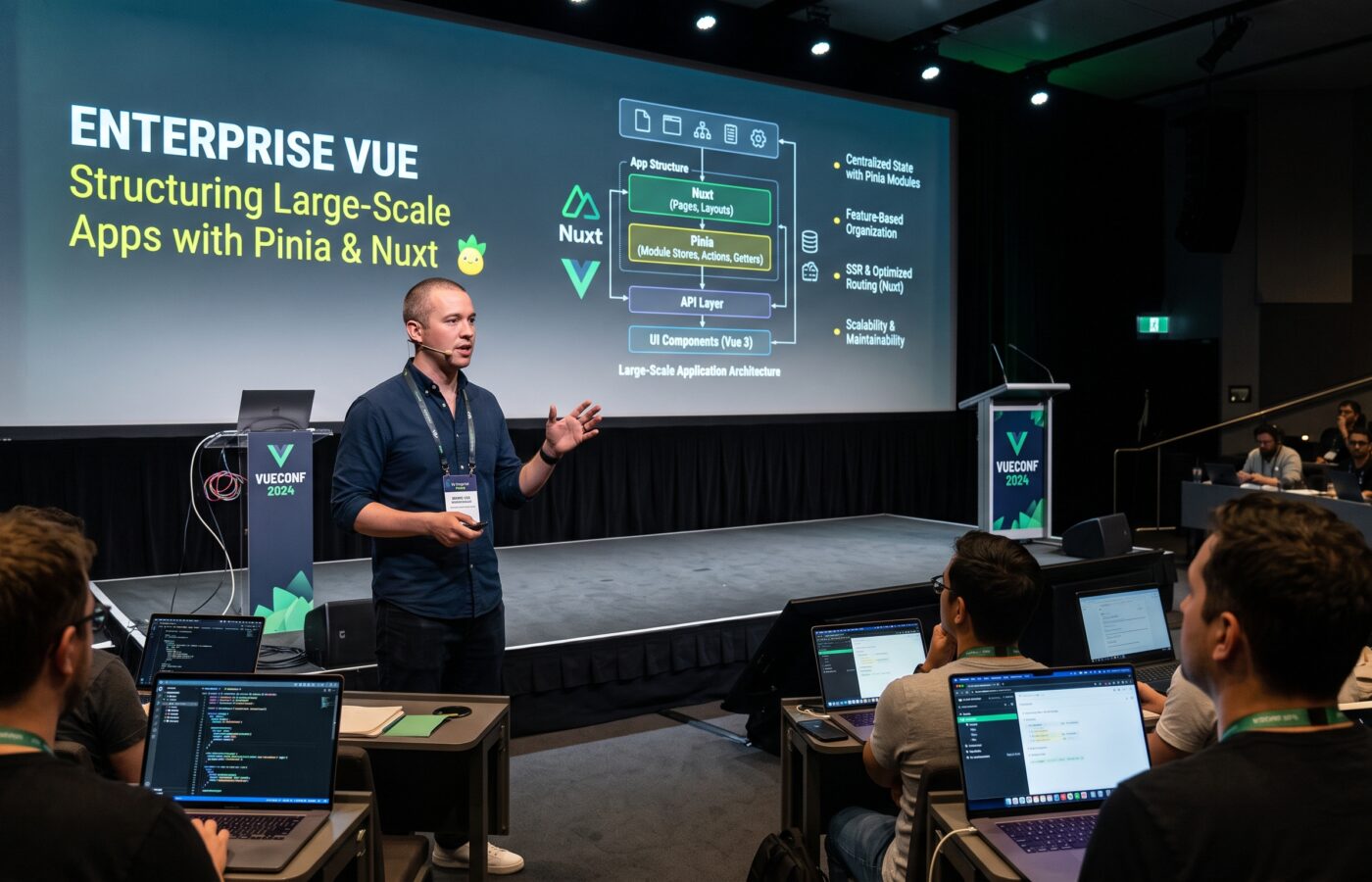
Enterprise Vue: Structuring Large-Scale Apps with Pinia and Nuxt

I have spent the last 14 years writing frontend code, and the last six of those almost entirely in Vue. Somewhere around year eight I stopped thinking about Vue as a framework I happened to use. I started thinking about it as a system I was personally responsible for scaling across an entire engineering org. That change in mindset alters everything. Picture the engineer who answers the page after a checkout flow breaks in production. Or the one explaining to a VP why a dashboard takes four seconds to paint. You stop caring about clever component tricks. You start caring about structure.
What follows is what I wish someone had handed me before I inherited my first genuinely large Vue codebase. It covers architecture patterns that survive team growth. It covers how to keep Pinia stores from turning into a second Vuex mess. And it covers how to pick a rendering strategy in Nuxt that actually fits your app, instead of whatever the last conference talk recommended.
Why structure beats cleverness
Small Vue apps forgive almost anything. Three developers, forty components, one Pinia store, everyone in the same Slack channel. Nobody notices bad decisions because nobody has to live with them for long.
Large apps do not forgive. I once watched a single 6,000 line component grind an entire team’s velocity to a crawl. Three squads all needed to touch it in the same sprint. On another project, a Nuxt app fetched the same user profile on every navigation, because nobody owned the caching story. Neither of these were framework problems. Vue did exactly what it was told. The problem was always that nobody had made a deliberate decision about where things live, who owns them, and how data flows.
The teams that scale well share a habit. They treat architecture as a product decision, not an implementation detail. They write it down, and they revisit it. Crucially, they accept that the right structure at 20,000 lines of code is not the right structure at 200,000 lines. Rigidity kills you just as fast as chaos does.
Architecture patterns that actually hold up
Organize by feature, not by file type
The classic beginner structure groups files by type. A components folder, a views folder, a store folder, a composables folder. It looks tidy in a tutorial. In a codebase with 40 developers, it becomes a nightmare. Every feature is scattered across five directories, and nobody can find anything without a project-wide search.
What works instead is organizing by domain or feature. A billing folder holds its own components, composables, types, and Pinia store. An onboarding folder does the same. Shared primitives, things like buttons, inputs, and layout shells, live in a common area. Every feature can import from that area, but it never imports back into a feature. This one change alone tends to cut new-hire ramp time significantly. A developer working on billing never has to leave the billing folder to understand billing.
Nuxt makes this easier than it used to be. Nuxt layers let you treat a feature, or even a whole product line, as a self-contained mini-application. Each one has its own pages, components, and config. The build then composes each layer into the parent app. I have used layers to let a marketing team ship their own landing pages on an independent release cadence. They still share the design system and auth logic with the core product. It behaves like a modular monolith rather than a single sprawling app, and it avoids the operational overhead of true micro-frontends.
Be honest about when you actually need micro-frontends
Every few months someone on a team proposes splitting the app into micro-frontends with Module Federation. Usually it is right after reading a blog post about how a much bigger company did it. My honest advice, after doing this twice, once successfully and once as a fairly expensive mistake, is that micro-frontends solve an organizational problem, not a technical one. They make sense when you have genuinely independent teams. Those teams need to deploy on separate schedules and cannot agree on a shared release train. Micro-frontends also add real cost. Duplicated dependencies, shared state headaches, and a build pipeline that is harder to reason about all come with the territory.
If your actual problem is that the codebase feels messy, a simpler fix exists. Nuxt layers or a disciplined feature-based structure will solve it for a fraction of the complexity. Save Module Federation for the day you have separate teams who truly cannot ship together.
Keep a layered mental model
Inside each feature, I push teams toward three rough layers. Presentation components only render and emit events. Composables hold business logic, validation, and orchestration. A data layer, usually a Pinia store paired with typed API clients, talks to the outside world. Components should never call an API directly. A composable should never reach past a Pinia store’s public getters and actions into its internals. This sounds obvious written down. Enforcing it through code review, though, is what actually prevents a project from decaying into spaghetti eighteen months later.
Modular state management with Pinia
Vuex taught a generation of Vue developers to be scared of state management, and honestly, that fear was earned. Mutations, namespaced modules, and a mountain of boilerplate for what should have been a simple update. Pinia fixed almost all of it. It did so by leaning into how Vue’s Composition API already works, rather than inventing a parallel universe of concepts.
One store per domain, never one store to rule them all
The single biggest mistake I see teams make with Pinia is treating it like they treated Vuex. One giant store ends up holding dozens of unrelated pieces of state, all bolted together. Pinia flips that pattern. Picture a cart store, a user store, a notifications store. Each one stays small and focuses on exactly one domain. Every one lives wherever that domain’s code already lives. Every store owns its own state, getters, and actions. You can test each one completely on its own, without spinning up the rest of the application.
This matters more than it sounds like it should. When a store is scoped tightly, you can trace every place its state changes just by reading one file. When a store tries to do everything, changing one field becomes an exercise in archaeology.
Composing stores instead of centralizing them
Stores are allowed to use other stores. A checkout store can call the cart store and the user store inside its own actions. This pattern replaces Vuex’s module namespacing. It is easier to follow, because it is just function calls, not string-based module paths. I generally advise against letting a store reach into component internals, or the reverse, outside of composables. The dependency direction should stay predictable, in one path only. Components depend on composables. Composables depend on stores. Stores depend on API clients. Nothing flows backward.
Type everything, and let the devtools do the work
If your team is on TypeScript, and at this point most serious Vue teams are, type your store state and action signatures explicitly. Do not let inference guess. The payoff shows up months later. Someone refactors a store, and the compiler catches every place that broke, instead of a customer reporting a silent bug three sprints later. Pinia’s devtools integration is genuinely excellent too. Time travel, state snapshots, and action tracing all work out of the box. Yet I still find engineers on my team who have never opened that panel. Show your juniors early. It saves hours.
Handling persistence and hydration carefully
Persisting store state to local storage is a common ask: cart contents, draft form data, feature flags a user toggled. Do it through a dedicated plugin pattern, rather than scattering storage calls through your actions. That keeps the persistence concern in one place. It also makes it trivial to swap storage mechanisms later.
The part people get wrong most often is hydration under server-side rendering. Say the server populates a store, then the client boots up and re-runs the same initialization logic. You can end up with duplicated network calls. Or worse, state silently diverges between server and client, and throws a hydration mismatch warning. The fix is boring but essential. Check whether state already exists before fetching. Make sure any store that touches browser-only APIs guards against running during server rendering at all.
Know when not to use a store
Not every piece of state deserves to live in Pinia. A form’s local validation state, a dropdown’s open or closed flag, a tooltip’s visibility: none of that needs to be global. I have seen teams cargo-cult every piece of reactive state into a shared store. That is what Vuex taught them to do years ago, and it only makes the app harder to reason about. If nothing outside a component’s own subtree needs to read a value, keep it local. Reach for a store only when two or more unrelated parts of the app genuinely need to share and react to the same data.
Server-side rendering strategies for production-grade apps
This is the area where I see the most confusion. Nuxt now gives you real choices, instead of forcing SSR on every route by default.
Match the rendering mode to what the page actually needs
Nuxt supports full server-side rendering, static site generation, incremental static regeneration, and pure client-side rendering. As of Nuxt 3, you can mix all of them in a single application using route rules. That last part is the piece teams underuse most. Pre-render a marketing homepage that rarely changes as static HTML, and serve it from a CDN edge. It costs almost nothing and loads instantly. A logged-in dashboard with personalized data benefits from full SSR. The first paint already contains real content, instead of a loading spinner. A rarely visited admin settings page might not need SSR at all. It can ship client-rendered to keep the server workload down.
Getting this wrong in either direction is expensive. I have seen teams server-render every single route out of habit. Their origin servers ended up doing full data fetches for pages that never changed. I have also seen teams go all-in on static generation for an app with genuinely dynamic, personalized content. That team then built a fragile client-side patchwork to fake what SSR would have given them for free.
Use route rules deliberately, not by default
Nuxt’s route rules configuration lets you declare rendering behavior per path pattern, rather than per page. The decision lives in one visible place, instead of being scattered across individual components. I push teams to write this configuration early in a project, even before most pages exist. It forces an explicit conversation about which parts of the app are truly dynamic. That conversation alone tends to surface architecture problems before they get expensive to fix.
Fetch data once, on the right side
useAsyncData and useFetch exist for one reason. A request made during server rendering should never repeat on the client during hydration. Skipping these composables in favor of manual fetch calls inside onMounted is one of the most common performance mistakes I audit. It quietly doubles your API load, and it delays the moment a page becomes interactive. Hydrate your Pinia stores from the payload Nuxt already serializes for you. Do not trigger a second round trip once the client takes over.
Cache aggressively, but cache the right things
Nitro, the server engine underneath Nuxt, supports response caching and stale-while-revalidate behavior out of the box. For anything that does not need to be real-time, and honestly that is most content, set a cache duration. Let the edge serve repeat requests without touching your origin. I have taken pages from a two-second server response time down to under 100 milliseconds. Sensible caching rules did it, with no changes to the actual page logic. The mistake to avoid is treating a personalized response like shared content. That bug is subtle and embarrassing. It always shows up as one user seeing another user’s data.
Monitor what SSR actually costs you
Server rendering trades client CPU for server CPU, and that tradeoff stays invisible until you measure it. Track your time to first byte. Track server response times the same way you track client-side performance metrics. A rendering strategy that looks great in a local demo can quietly become your biggest infrastructure cost, once real traffic and real data payloads show up. Revisit this mix every quarter or two. The right rendering choice for a page often changes as its traffic and content change.
A real migration, and what it taught the team
The clearest example I can give is a retail platform I worked on. That app had grown for three years with no structural plan at all. One store held everything. A dozen unrelated folders held components with no clear owner. The server fully rendered every page, whether it needed it or not. We rebuilt the architecture over roughly two quarters, not as a rewrite but as an incremental migration. It went feature folder by feature folder, while the old and new structures coexisted.
We split the single global store into 14 domain-scoped Pinia stores, one per business area: catalog, cart, checkout, account, search, and so on. From there, we moved marketing and category pages to static generation with route rules. We kept the checkout flow on full SSR, because it needed personalized, real-time inventory data. We left the internal admin tools client-rendered entirely. Time to first byte on the marketing pages dropped by more than half. Server infrastructure costs dropped too, since we were no longer paying to render pages that never changed.
None of that came from a clever trick. It came from being willing to say, explicitly and in writing, what kind of page each route was. Then we treated that decision as part of the architecture, rather than an afterthought.
What I would tell a team starting this today
Start with the folder structure before you write a line of state management code. Decide, on paper, which parts of your app several teams genuinely share. Decide, too, which parts belong to a single feature. Keep Pinia stores small and scoped to one domain. Resist the urge to build one store that knows everything. Write your Nuxt route rules early, and revisit them as traffic patterns change. Accept, too, that architecture is never finished. The structure that carries you through your first year will need to change again once the team doubles. That is a sign of success, not a failure of planning.
Vue rewards teams that respect structure. It does not punish you the way some frameworks do when you get it wrong early. That is exactly why so many teams get away with sloppy decisions for a while. The cost shows up later, quietly, in slow onboarding, fragile deploys, and features that take three times longer than they should. Fix the structure first. Everything else gets easier after that.
Frequently asked questions
Is Pinia actually better than Vuex for large Vue applications?
For most teams building new applications, yes. Pinia removes mutations, supports the Composition API natively, and gives you better TypeScript inference with far less boilerplate. Vuex still works, but it demands more discipline to stay organized at scale.
Source: State Management in Vue 3 with Pinia
Should every Vue application use server-side rendering?
No. SSR makes sense for pages that need fast first paint, strong SEO, or personalized content on load. Static generation or client rendering is often cheaper and simpler for content that rarely changes.
Source: Rendering Modes, Nuxt Documentation
When does a Vue project actually need micro-frontends?
Only when separate teams need genuinely independent deploy schedules and cannot share a release train. For most codebases, a feature-based structure or Nuxt layers solves the same organizational pain at a lower cost.
Source: Building micro-frontends with Webpack’s Module Federation
How many Pinia stores is too many?
There is no fixed number. The right question is whether each store maps to a clear domain. Splitting by feature, the same way you would organize folders, keeps stores readable even as the count grows into the dozens on a large application.
Source: Building Modular Store Architecture with Pinia in Large Vue Apps
What is the biggest performance mistake teams make with Nuxt SSR?
Teams often fetch the same data twice. Once on the server, then again on the client during hydration. It usually happens because someone called a fetch function inside a lifecycle hook, instead of using useAsyncData or useFetch. This doubles API load and delays interactivity.
Source: Optimizing Nuxt Server Side Rendering Performance
Are Nuxt layers a replacement for micro-frontends?
For most organizations, yes. Layers let you compose feature sets, each maintained independently, into one application at build time. That gives you much of the modularity teams want from micro-frontends, without the runtime complexity or duplicated dependencies.
Source: Building a Modular Monolith with Nuxt Layers
References
- Rendering Modes, Nuxt Documentation
- Vue.js Project Structure: A Feature-Based Architecture That Scales, Vue School
- Nuxt Rendering Modes and Hybrid Rendering, Vue School
- Optimizing Nuxt Server Side Rendering Performance, DebugBear
- Building Modular Store Architecture with Pinia in Large Vue Apps, Medium
- Vue.js Modular State Management: Best Practices for Scalable and Maintainable Store Configuration, Monterail
- Building micro-frontends with Webpack’s Module Federation, LogRocket Blog
- Building a Modular Monolith with Nuxt Layers, alexop.dev
- State Management in Vue 3 with Pinia, Djamware
- Rendering Modes in Nuxt 3, This Dot Labs