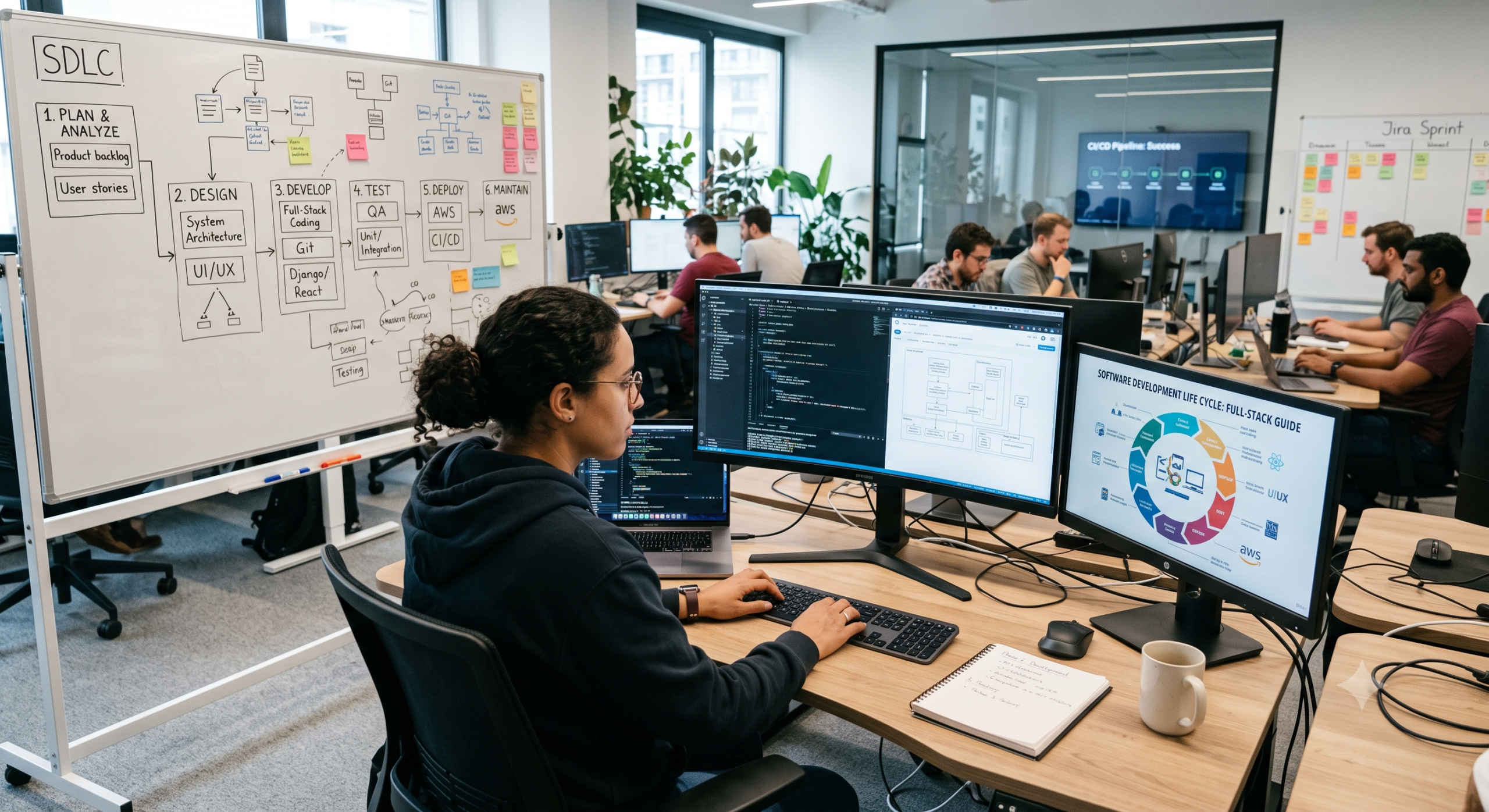
Building software through a clear software development process is rarely as simple as opening an editor and starting to write code. In fact, I have frequently seen projects begin with a great idea, move quickly through the first few screens, and then suddenly stall. Consequently, once the team discovers that nobody agreed on the requirements, the database design fails to scale, or the application behaves differently in production, progress grinds to a halt. That is precisely why a well-structured software development process matters so much. Ultimately, this process gives developers, designers, product owners, testers, and business stakeholders a shared pathway to move from an abstract idea to fully working software. Furthermore, it gives the team continuous opportunities to catch issues early, before they evolve into expensive problems in production.
What Is the Software Development Process?
The software development process is the organized set of activities a development team follows to understand a problem, plan a solution, design the system, write code, test it, release it, and maintain it over time.
Naturally, the exact implementation differs from one company to another. For example, a small startup might rely on two developers discussing requirements over a quick video call and deploying several times a day. On the other hand, an enterprise team might involve product managers, UX designers, architects, developers, QA engineers, security teams, DevOps specialists, and compliance reviewers in a single release.
Despite these operational differences, the underlying lifecycle remains surprisingly consistent across the board.
The 7 Phases of a Typical SDLC
-
Planning
-
Requirements and analysis
-
System and software design
-
Implementation
-
Testing
-
Deployment
-
Maintenance
Both IBM and Atlassian describe seven-phase versions of the SDLC; however, individual organizations and methodologies often vary the exact names and boundaries of individual phases.
The crucial point to recognize, therefore, is that these phases do not represent seven completely separate activities. Instead, in modern Agile and DevOps environments, they overlap, feed into each other, and repeat continuously.
1. Planning: Decide What You Are Actually Building
Every successful software project starts with a real problem worth solving. Consequently, planning is where the team asks foundational questions that developers often wish stakeholders had answered before anyone wrote the very first line of code.
-
What problem are we solving?
-
Who encounters this problem?
-
What should the application accomplish?
-
What does success look like?
-
How much time and money can we spend?
-
What technical or business constraints already exist?
At this stage, the team defines the project’s scope, objectives, resources, risks, priorities, and expected outcomes. In addition, AWS identifies essential activities such as cost-benefit analysis, scheduling, resource estimation, and allocation as core components of planning.
Based on my experience as a full-stack developer, planning does not mean predicting every minor detail six months into the future. Rather, it means creating enough initial clarity so the team understands what it is trying to achieve.
Setting Useful Requirements
For instance, imagine a company wants to build an online appointment platform.
-
A vague requirement would be: “We need an appointment website.”
-
A useful requirement, however, would be: “Customers should be able to find available appointment slots, book a service, receive confirmation, and cancel within the allowed cancellation period.”
As a result, that second statement gives developers something concrete they can actually design and test.
Furthermore, effective planning identifies what not to build. Scope control may be one of the least glamorous parts of the software development process, yet it routinely saves projects from ballooning into endless collections of unused features.
2. Requirements and Analysis: Understand the Problem Before the Code
Once the team establishes the project direction, members must understand the underlying requirements in far greater detail. In this phase, the team systematically translates high-level business goals into technical and functional specifications.
For a typical web application, developers must determine:
-
What actions users can perform
-
What information the system stores
-
Which user roles carry specific permissions
-
Which external APIs the application requires
-
What level of performance users expect
-
What security standards apply
-
What happens when a system failure occurs
-
Which devices and browsers the application must support
This phase is particularly vital for full-stack development because frontend and backend decisions tightly interconnect.
Suppose, for example, a product owner states that users need “real-time notifications.” Immediately, that request raises critical technical questions:
-
Does “real-time” imply WebSockets, Server-Sent Events, Push Notifications, or Email?
-
How many concurrent users does the business expect?
-
Moreover, what happens if a user’s connection drops?
Ideally, developers should address those architectural decisions upfront, rather than discovering them accidentally after writing the core code.
Requirements analysis also provides an invaluable opportunity to spot risks early. As IBM notes, using the SDLC helps teams identify technical challenges earlier while improving transparency and alignment with stakeholder expectations. Consequently, the team arrives at a clear, shared vision of what the system needs to accomplish and the constraints under which it must operate.
3. System Design: Turn Requirements Into an Architecture
This is usually one of my favorite stages in the software development process because it is where abstract ideas transform into a tangible system architecture.
Essentially, the design phase answers a single central question: How are we going to build this?
For a modern web application, the design blueprint typically covers:
-
Frontend & Backend: Architecture, state management, and frameworks
-
Data & Storage: Database structure, caching layers, and file storage
-
Integrations & Security: API design, authentication, authorization, third-party integrations, and security controls
-
Operations: Infrastructure, logging, monitoring, and deployment pipelines
A full-stack developer must clearly understand how these individual pieces interlock.
For instance, a standard e-commerce application relies on a browser-based frontend communicating with a backend API. Meanwhile, external services sit alongside the core application to handle payments, transactional emails, search, or cloud storage.
Choosing the Right Stack
Additionally, the design phase is where teams select their technology stack:
-
Should the application use React, Vue, or Angular on the frontend?
-
Should the backend rely on Node.js, Python, Java, or Go?
-
Should the database be PostgreSQL, MySQL, or MongoDB?
Ultimately, no single “best” stack exists. The correct choice depends on your specific requirements, team experience, performance needs, budget, and long-term maintenance goals. However, one common mistake I regularly see is choosing technologies simply because they are fashionable. In reality, good architecture is less about adopting the newest tools and more about making sensible, well-reasoned trade-offs.
4. Implementation: Where the Design Becomes Software
Now we reach the phase most people naturally associate with software development: writing code. During implementation, developers convert detailed designs and requirements into working software.
Because full-stack developers work across multiple layers, their daily tasks during this phase span both sides of the stack:
-
On the Frontend: Building responsive pages, modular components, accessible forms, client-side validation, and state management systems.
-
On the Backend: Constructing robust APIs, authentication systems, business logic, background jobs, database queries, and error-handling routines.
-
In the Database Layer: Designing tables, indexes, constraints, migrations, and query strategies that safeguard performance and data integrity.
Furthermore, modern development depends heavily on structured version control and team collaboration. For example, platforms such as GitLab emphasize workflows built around code creation, peer reviews, commits, version tracking, and continuous integration throughout the lifecycle.
Above all, the goal of implementation is not simply to write a large volume of code. Rather, it is to produce clean, maintainable, and readable software that directly solves the original problem.
5. Testing: Find Problems Before Users Do
Testing is where the team actively challenges the software it just built. Importantly, effective testing is far more than just clicking a few buttons and hoping nothing breaks.
Because different types of testing evaluate different aspects of the application, teams utilize several layered strategies:
-
Unit Testing: Validates individual functions and isolated pieces of code.
-
Integration Testing: Checks whether separate modules and external services work together properly.
-
End-to-End (E2E) Testing: Evaluates complete, realistic user workflows from start to finish.
-
Performance Testing: Examines how the application behaves under high traffic and load.
-
Security Testing: Actively scans for vulnerabilities, leaks, and systemic weaknesses.
-
User Acceptance Testing (UAT): Confirms that the software fulfills business requirements and user expectations.
Consider, for example, an online store. A customer might appear able to browse products, yet the entire process collapses when payment processing interacts with inventory tracking. Therefore, testing individual components in isolation is never enough; teams must thoroughly validate how components interact.
Elevating Security in Testing
Similarly, security deserves dedicated attention throughout this process. As NIST’s Secure Software Development Framework recommends, teams should integrate security practices directly into every SDLC phase rather than treating security as a final, rushed inspection. Consequently, developers should evaluate security while defining requirements, designing architecture, writing code, managing third-party dependencies, and preparing deployments.
6. Deployment: Move From Development to Production
Eventually, software must leave the local development environment and enter the real world. Deployment is the systematic process of publishing the application so users can access it in its target environment.
For a modern web app, a typical deployment sequence includes:
-
Building application assets
-
Running automated test suites
-
Generating deployment artifacts
-
Executing database migrations
-
Provisioning necessary infrastructure
-
Configuring environment variables and DNS routing
-
Verifying application health and monitoring post-release
This is precisely where DevOps and Continuous Integration/Continuous Delivery (CI/CD) practices become indispensable. Instead of manually uploading files to a server, teams rely on automated pipelines that validate, build, test, and ship code according to predefined criteria.
Moreover, teams can execute modern deployments gradually using methods like feature flags, canary releases, or blue-green environments to minimize risk.
From a developer’s perspective, however, deployment is often a reality check. An application that runs flawlessly on a local machine may behave entirely differently in production due to network latency, variable database sizes, caching behavior, or unexpected traffic spikes. Thus, the classic excuse “it works on my machine” is never the end of development—in fact, it often marks the beginning of another debugging phase.
7. Maintenance: Software Is Never Really Finished
The final phase is maintenance, though I would argue it is actually the beginning of the next cycle. Once real users begin interacting with an application, fresh insights immediately emerge:
-
Users discover obscure bugs.
-
Stakeholders request new features.
-
Certain interfaces prove confusing.
-
Application traffic grows and scales up.
-
Third-party dependencies become outdated.
-
New security vulnerabilities surface over time.
Consequently, the team must continuously evolve the application through bug fixes, performance tuning, security patches, code refactoring, and infrastructure adjustments.
This ongoing cycle is precisely why the term “life cycle” is so fitting. The software development process does not abruptly end when version 1.0 reaches production. Instead, real-world operational feedback directly informs the next iteration of planning. Therefore, mature engineering teams treat continuous monitoring—via logs, error reports, performance metrics, and user feedback—as an integral part of ongoing development rather than an afterthought.
How Agile Transforms the Lifecycle
One common misconception is that following an SDLC automatically implies a rigid, traditional Waterfall approach. However, that is simply not the case.
The SDLC defines what phases software goes through, while methodologies like Waterfall or Agile define how teams navigate them. As Atlassian notes, teams can effectively adapt the SDLC to various delivery models depending on the project’s scope and requirements.
| Approach |
How the Lifecycle Runs |
Best Suited For |
| Waterfall |
Sequences phases linearly; each stage finishes completely before the next begins. |
Projects with fixed requirements, strict compliance, or unchangeable scope. |
| Agile |
Cycles through phases in short, iterative bursts (sprints) to deliver incremental features. |
Dynamic projects where user feedback and requirements evolve over time. |
For example, instead of spending six months building an entire e-commerce platform before showing it to customers, an Agile team might plan, design, code, test, and release just the user login and product catalog in two weeks. As a result, real user feedback from that initial release directly shapes the next development cycle.
The fundamental lifecycle remains identical; only the timing and iteration frequency change.
Where Security Fits Into the Process
Teams must never reduce security to a single, final checkbox before launch. On the contrary, they should weave security seamlessly into every single stage of the software development process:
-
Planning: Identify regulatory mandates and security boundaries early.
-
Analysis: Map out sensitive data flows and potential threat vectors.
-
Design: Choose robust authentication protocols, encryption standards, and network isolation models.
-
Implementation: Practice secure coding, sanitize inputs, and regularly audit third-party packages.
-
Testing: Perform automated static analysis, dependency scanning, and penetration testing.
-
Deployment: Securely manage infrastructure, access keys, and environment secrets.
-
Maintenance: Continuously monitor for emerging vulnerabilities and issue security patches promptly.
According to NIST’s SSDF framework, organizing security around proactive preparation, software protection, and rapid response produces far better outcomes. After all, resolving a security flaw during the design phase is drastically easier—and cheaper—than patching a critical exploit after users widely adopt a system.
What Makes a Good Software Development Process?
A good process does not need to be overly bureaucratic. In fact, excessive rules and meetings can hinder software delivery just as easily as having no structure at all.
Ideally, a practical software development process should balance structure with speed by providing:
-
Clear Requirements: Ensuring everyone understands what the team is building and why.
-
Manageable Work Units: Breaking large features down into small, deliverable tasks.
-
Traceable Version Control: Keeping a clean history of every code change.
-
Peer Code Reviews: Allowing team members to catch errors before changes reach production.
-
Automated Testing: Guarding against regressions automatically with every release.
-
Embedded Security: Considering risk at every step of the development lifecycle.
-
Continuous Feedback Loops: Using real-world data and user input to drive future updates.
-
Living Documentation: Keeping architectural and setup decisions clear and accessible.
Ultimately, the best process is not the one with the most documentation; rather, it is the one that gives developers enough clarity and confidence to move quickly without creating chaos.
Common Mistakes to Avoid
Across many software projects, the exact same missteps tend to repeat themselves:
-
Coding before understanding: Starting implementation before clearing up the core problem and requirements.
-
Over-scoping: Attempting to build an entire, complex platform all at once instead of shipping incrementally.
-
Ignoring technical debt: Delaying refactoring and updates until small issues compound into an emergency.
-
Siloing testing: Treating QA as “someone else’s problem” rather than a shared team responsibility.
-
Over-engineering: Designing complex systems for hypothetical future scale instead of solving today’s actual problems.
-
Manual deployment processes: Relying on undocumented, manual release procedures that invite human error.
In summary, focusing strictly on short-term speed while ignoring long-term maintainability is a false economy. A feature that takes two days to write but causes months of bugs does not deliver true value quickly. Therefore, strong engineering always accounts for the total cost across the entire lifecycle.
Final Thoughts
At its core, the software development process is about systematically reducing uncertainty. You start with an idea that is inherently incomplete, and step by step, you transform that idea into clear requirements, solid architecture, reliable code, automated tests, robust infrastructure, and ultimately, a great product that solves real problems.
The seven SDLC phases—planning, analysis, design, implementation, testing, deployment, and maintenance—provide an indispensable roadmap for that journey. While industry leaders like IBM, AWS, and Atlassian frame these stages in slightly different ways, the underlying goal remains identical: delivering high-quality, reliable software predictably.
As a full-stack developer, the most valuable lesson I have learned is simple: software development involves far more than just writing code. In truth, writing code represents only one part of the equation. Understanding the core problem, designing scalable systems, prioritizing security, testing assumptions, deploying safely, and continuously refining the product are equally vital.
When all of those elements work in harmony, software development becomes far more predictable. And as a result, every time the cycle repeats, your software gets better instead of just getting bigger.
Frequently Asked Questions
What is the software development process?
The software development process is a structured workflow teams use to plan, analyze, design, build, test, deploy, and maintain software. Overall, it helps teams manage requirements, quality, security, resources, and continuous improvements effectively.
What are the 7 phases of the SDLC?
The standard seven phases are planning, analysis, design, implementation, testing, deployment, and maintenance. However, organizations may combine or rename some of these steps depending on their workflow.
Is the SDLC the same as Agile?
No. The SDLC describes the overall software lifecycle itself, whereas Agile is a specific development methodology that teams use to execute that lifecycle. Specifically, Agile breaks the SDLC down into small, rapid iterations rather than one long, linear sequence.
Why is testing so critical in software development?
Testing identifies functional bugs, integration issues, performance bottlenecks, and security vulnerabilities before software reaches production. As a result, it prevents costly downtime, user frustration, and emergency hotfixes.
When should security be introduced in the process?
Teams should incorporate security from the very beginning of the lifecycle—starting during initial planning and requirements—and continue throughout design, coding, testing, deployment, and long-term maintenance.
How does DevOps impact the software development process?
DevOps bridges the gap between software development and IT operations through automation, continuous integration, continuous delivery (CI/CD), and proactive monitoring. Consequently, teams can deploy software updates faster, safer, and more reliably.
References & Further Reading
-
IBM — What Is the Software Development Lifecycle (SDLC)?
An in-depth guide to SDLC principles, core phases, and traditional versus modern delivery models.
-
AWS — What Is SDLC?
An architectural overview of SDLC execution focusing on cloud delivery, risk management, and scalable practices.
-
NIST — Secure Software Development Framework (SSDF)
Official guidelines detailing how to embed security practices into every phase of the software lifecycle.
-
GitLab Documentation — Managing Code and the Development Lifecycle
Hands-on documentation covering modern repository workflows, code reviews, CI/CD pipelines, and version management.