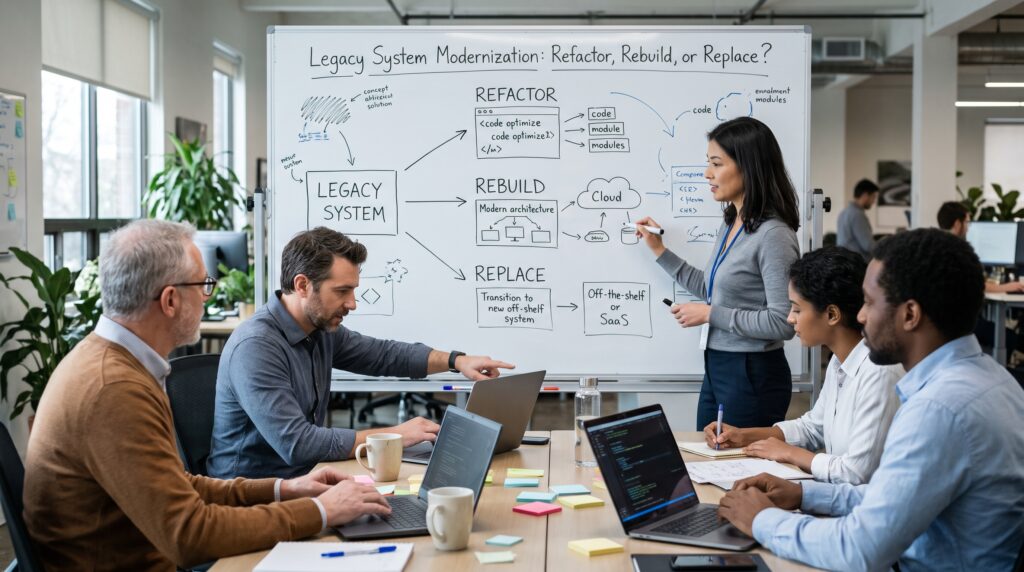
Every few months someone puts the same slide in front of me. Three boxes, three verbs: refactor, rebuild, replace. The sponsor wants me to point at one so the program can secure funding before the next budget cycle closes. I understand the impulse. However, after enough years sitting between business owners who want speed and engineering teams who want to stop living in fear of a twenty-year-old codebase, I have learned that legacy system modernization rarely comes down to picking one box. Instead, it comes down to understanding what you actually own, what it is worth, and how much risk the organization can carry while the work is happening.
This piece, then, is the conversation I wish I could have with every steering committee before that slide appears. I write it from the architect’s chair, not the vendor’s, so I will be honest about where each path tends to break.
Why Legacy System Modernization Keeps Landing on the Architect’s Desk
The pressure is real, and it is not just engineers complaining. McKinsey surveyed fifty CIOs and found that 10 to 20 percent of the technology budget meant for new products goes to resolving tech debt. Moreover, those same CIOs estimated that debt at 20 to 40 percent of the value of their entire technology estate. One former CIO quoted in that research described cutting the share of engineer time spent paying the debt “tax” from 75 percent down to 25 percent. That kind of swing changes what a company can build.
The public sector, meanwhile, shows the cost of waiting even more plainly. In 2019 the U.S. Government Accountability Office reviewed 65 federal systems and named the 10 most critical legacy systems in need of modernization, ranging from 8 to 51 years old. When GAO came back in 2025, it reported that agencies had completed only three of those ten modernizations. In addition, its updated review flagged 11 critical systems across 10 agencies, many still running outdated languages, unsupported hardware, or known security weaknesses. These are organizations with enormous budgets and clear mandates. So if they struggle to finish, a mid-market company with a lean IT team should take the planning seriously.
The question about legacy system modernization is fair, therefore. The mistake is treating it like a menu choice instead of a portfolio decision.
What “Legacy” Actually Means in Practice
I avoid defining legacy by age. After all, I have seen fifteen-year-old Java services that were a pleasure to change and two-year-old platforms that were already unmaintainable because a contractor who has since vanished assembled them in a hurry.
My working definition is simpler. A system becomes legacy when the cost and risk of changing it start to outrun the value of the change. You see it in the symptoms: release cycles measured in quarters, a single person who understands the batch jobs, integration work that requires a ticket to another team and a prayer, and audit findings about end-of-support software that nobody can upgrade without breaking something downstream.
That definition matters because it reframes the goal. Legacy system modernization is not about making things new. Rather, it is about restoring the organization’s ability to change the system at a reasonable cost. Hold onto that, because it is the yardstick for every option below.
The Three Doors of Legacy System Modernization, and the Two Nobody Puts on the Slide
The refactor, rebuild, replace framing is a simplified version of the migration strategy models most of us use. For example, AWS describes seven common migration strategies: retire, retain, rehost, relocate, replatform, repurchase, and refactor, building on earlier work from Gartner. Collapse those into plain business language and you get roughly three active paths.
Refactor means keeping the system and improving its internal structure, often moving it onto a better runtime or cloud platform along the way. Rebuild means writing new software to do what the old software did, ideally better. Replace, finally, means buying a commercial product or SaaS platform and moving your processes onto it.
What the slide almost always leaves out are the other two honest answers: retain and retire. You should simply leave some systems alone for now, wrapping them with monitoring and an API, because the business case for touching them is weak. Likewise, you should shut others down, because a surprising share of any portfolio is doing work nobody needs anymore. In nearly every assessment I have run, the retire pile pays for a meaningful part of the rest of the program. Start there.
Refactor: The Quiet Workhorse of Legacy System Modernization
Refactoring is the least glamorous legacy system modernization option and, in my experience, the one that most often delivers. You keep the business logic that has survived years of production use, and you improve the structure around it: break apart the worst coupling, add automated tests, externalize configuration, containerize, replace the homegrown scheduler, and move the database onto a supported version.
Refactor tends to win when the core logic is still correct and still differentiating. Pricing engines, underwriting rules, claims adjudication, and specialized scheduling logic often fall into this category. The code may be ugly, but it encodes years of edge cases that the business discovered the hard way.
Where refactoring goes wrong, though, is when teams use the word as cover for an open-ended cleanup with no destination. For that reason, I insist on a target architecture and a measurable outcome before approving refactor work. “Reduce lead time for changes on the billing module from six weeks to one week” is a goal. “Clean up the code” is not.
One caution is worth stating clearly. AWS advises against refactoring during large migrations, because modernizing during the move is the most complex strategy to manage at scale. I agree. If you are moving out of a data center on a deadline, rehost or replatform first, stabilize, and then refactor the systems that earn it. Trying to do both at once is how timelines double.
Rebuild: High Reward, High Ceiling for Failure
Every engineering team eventually asks to rewrite. I understand why. Reading old code is harder than writing new code, and a blank page feels like freedom.
Joel Spolsky made the counterargument in Things You Should Never Do, Part I back in April 2000, using Netscape’s decision to rewrite its browser from scratch as the cautionary tale. His central point still holds. The old code looks messy partly because it has absorbed years of bug fixes and real-world knowledge, and a rewrite throws all of that away while you spend years rebuilding parity instead of shipping value.
When a Rebuild Is Worth It
Still, I do not think the lesson is “never rebuild.” I think the lesson is “never rebuild in one big bang.” There are legitimate reasons to write new software. For instance, the platform may be truly unsupportable, such as a proprietary 4GL whose vendor no longer exists. Sometimes the domain has changed so much that the old model actively fights the business. And occasionally the system is small enough that a rebuild is a matter of weeks, not years.
Grow the New System Around the Old One
When a rebuild makes sense, I almost always run it as an incremental replacement using the approach Martin Fowler named the Strangler Fig Application. He first wrote about it in 2004 and, in 2019, renamed the post to emphasize the metaphor. Instead of building the whole new system in a back room and flipping a switch, you grow the new system around the edges of the old one, routing one capability at a time to new code until the legacy core has nothing left to do. As a result, the business sees value early, and the team gets constant feedback from production instead of a terrifying cutover weekend.
The questions I ask before approving any rebuild are blunt. Do we have people who understand the current behavior well enough to specify it? Do we have characterization tests, or can we build them, so that we know when the new system disagrees with the old one? Can the business tolerate running two systems in parallel for a year or more? If the answers are no, then the rebuild is a bet, not a plan.
Replace: Buying Your Way Forward
Replacement through a commercial or SaaS product is the right answer far more often than engineers like to admit. If the capability is not what makes your company different, you probably should not be writing or maintaining software for it. General ledger, payroll, HR, standard CRM, ticketing, and most document management, for example, fall squarely into this category for most businesses.
The appeal is obvious: someone else carries the upgrade burden, the security patching, and the feature roadmap. The traps, however, are less obvious, and I have watched organizations walk into every one of them.
The Traps Nobody Mentions in the Sales Demo
The first trap is customization. A team buys a product to escape a custom system, then customizes the product until it becomes a custom system with a licensing fee. My rule, therefore, is that you adapt your process to the product for anything that is not a genuine differentiator, and you put any truly unique logic in a separate service that integrates with the product rather than inside it.
The second trap is data migration. Vendors usually sell replacement projects on features, and then the data delays them. Years of inconsistent records, undocumented codes, and fields used for three different purposes do not map cleanly onto a vendor’s schema. That is why I start data profiling in week one, not month six.
The third trap is the integration web. The old system often feeds a dozen other systems through file drops and direct database reads that nobody documented. Replace the core without mapping those consumers, and you break things you did not know existed.
Replacement also carries a strategic trade-off. You give up control of the roadmap. For commodity capabilities, that is a fair trade. For anything that touches how you win customers, however, think hard before handing the steering wheel to a vendor.
How I Actually Make the Legacy System Modernization Call
When I sit down with a portfolio, I work through the same handful of questions for each significant system. Interestingly, none of them is technical at first, which surprises some people.
Five Questions I Ask About Every System
1. Does this capability differentiate us? If customers choose us partly because of what this system does, I lean toward refactor or a careful incremental rebuild, because I want to own that logic. If it is commodity, on the other hand, I lean hard toward replace or retire.
2. Is the business logic still correct? If the rules inside the system are right and only the technology is tired, refactoring preserves real value. If the rules themselves are outdated, however, preserving them is pointless, and a rebuild or replacement becomes more attractive.
3. How much knowledge lives only in the code and in a few heads? Systems with thin documentation and a shrinking pool of experts carry key-person risk. That pushes me to start with discovery and characterization tests regardless of the eventual path, because every option depends on knowing what the system really does.
4. Where does the data live, and who depends on it? Data gravity decides more modernization programs than architecture diagrams do. For example, a system that is the system of record for twenty downstream consumers needs a migration approach that keeps those consumers working throughout.
5. How much disruption can the business absorb, and for how long? A retailer heading into peak season, a bank under regulatory review, and a manufacturer launching a product line all have very different appetites for parallel running and change fatigue. In short, the best technical plan fails if it collides with the business calendar.
What the Answer Usually Looks Like
After those five questions, I usually end up with a mixed answer across the portfolio. A handful of systems retire. Next, we rehost or replatform several to stop the bleeding. Commodity functions move to a replacement product. Then we refactor or incrementally rebuild one or two strategic systems. That mixture is not indecision. On the contrary, it is what a sensible legacy system modernization roadmap actually looks like.
Patterns That Lower Legacy System Modernization Risk on Any Path
Whichever door you choose, a few architectural patterns do most of the heavy lifting in keeping the business running while the work happens.
A routing facade. Microsoft’s guidance on the Strangler Fig pattern describes placing a facade or proxy between client applications and both the legacy and new systems. That facade lets you move traffic one capability at a time, roll back instantly if something misbehaves, and eventually remove the facade or keep it as an adapter for older clients. Consequently, I treat it as nonnegotiable on any incremental program.
An anti-corruption layer. When new services must talk to the old system, you do not want legacy data models leaking into your clean design. The Anti-Corruption Layer pattern, drawn from domain-driven design, places a translation layer between the two worlds so each keeps its own model. It adds latency and another component to operate, though, so decide early whether it is permanent or temporary.
Testing and Data Safeguards
Characterization tests before any change. Before you refactor or rebuild, capture what the system does today, including the weird behavior. These tests are the safety net that lets you change structure with confidence. They are also the referee that tells you when a new implementation disagrees with the old one.
Parallel runs for critical calculations. For anything involving money, compliance, or safety, run the old and new logic side by side on real inputs and compare outputs before switching over. It is tedious. However, it also catches the defects that would otherwise surface in a customer complaint or an audit.
Data first, not data last. Profile, clean, and model the data early. Then decide which system is the source of truth for each entity at every stage of the migration. Most cutover disasters I have seen were data problems wearing a technology costume.
Building a Legacy System Modernization Business Case Leadership Will Fund
The most technically elegant modernization plan still fails if it cannot win funding and keep it. The advice I find most useful here comes from the same McKinsey research: treat tech debt as a business issue, not a technology problem, and trace ownership of each system’s debt to the profit and loss it serves.
In practice, that means the business case should speak the language of the people who own the revenue and the risk. Instead of “migrate to microservices,” say “cut the time to launch a new product variant from four months to three weeks.” Similarly, instead of “upgrade the database,” say “remove an audit finding and avoid paying extended support fees next year.” Quantify the run cost of the current system, the cost of incidents and workarounds, and the revenue opportunities that the current system blocks today.
Fund in Phases, Plan in Writing
I also push for funding in phases tied to outcomes rather than one large capital request. Phase one is discovery and quick wins, including the retire list. After that, we approve each later phase on evidence from the previous one. Sponsors appreciate seeing value early, and it gives the program a natural point to change course if the assumptions turn out wrong.
Finally, GAO’s findings are a useful warning for any organization: agencies without fully documented modernization plans face a higher likelihood of cost overruns, schedule delays, and outright failure. A plan does not need to be a binder. It does, however, need milestones, a target architecture, a clear description of what the team will decommission and when, and named owners on both the business and technology sides.
The Legacy System Modernization Mistakes I See Most Often
A few patterns repeat so often that I now raise them in the first meeting.
Modernizing the technology but not the process. Moving a clunky workflow onto a shiny platform gives you a clunky workflow on a shiny platform. So bring process owners in from the start.
Underestimating the long tail. The first 80 percent of functionality moves quickly. The last 20 percent, by contrast, with its reports, exceptions, and month-end jobs, takes as long as everything before it. Budget for it.
Never actually turning the old system off. I have walked into organizations running both the legacy and the new platform three years after a “completed” migration, paying for both. Decommissioning, therefore, should be a milestone with an owner and a date, not an afterthought.
Letting the vendor define the architecture. Partners and vendors bring valuable skills, but their incentives are not identical to yours. Keep architectural decisions and the target state in-house, even if you outsource delivery.
Treating modernization as a project with an end date. Systems start becoming legacy again the day they go live. The organizations that do this well, in fact, build continuous modernization into their operating model, with a standing budget for paying down debt so they never end up facing another decade-sized rewrite.
So, Refactor, Rebuild, or Replace?
If you force me to answer the slide on legacy system modernization, here is my honest position. Replace what does not differentiate you. Refactor what holds valuable, correct logic but sits on a tired foundation. Rebuild only what is truly unsupportable or fundamentally misaligned with the business, and do it incrementally. Meanwhile, retire whatever you can, and retain the rest deliberately rather than by neglect.
Ultimately, good legacy system modernization is less about the choice of verb and more about discipline: knowing what you have, tying every move to a business outcome, protecting the running business with sound patterns, and actually switching the old things off. Get those right, and the three boxes on the slide stop looking like a gamble. Instead, they start looking like a sequence.
Frequently Asked Questions
What is legacy system modernization?
Legacy system modernization is the process of updating, restructuring, or replacing older software and infrastructure so the organization can change it at a reasonable cost and risk. It can involve retiring systems, moving them to new platforms, refactoring code, rebuilding applications, or adopting commercial products. AWS outlines the common options in its migration strategies guidance.
Is it better to refactor or rewrite a legacy application?
For most systems with correct, valuable business logic, refactoring is safer than a full rewrite, because it preserves years of accumulated fixes and edge-case handling. Joel Spolsky’s essay Things You Should Never Do, Part I remains the classic argument against big-bang rewrites. When you truly need a rebuild, however, doing it incrementally greatly reduces risk.
What is the strangler fig pattern?
The strangler fig pattern is an incremental approach in which a new system gradually takes over functions from a legacy system, usually behind a routing facade, until the business can decommission the old system. Martin Fowler named it in his Strangler Fig Application article, and Microsoft provides implementation guidance in its Azure Architecture Center.
When should a company replace a legacy system with SaaS?
Replacement makes the most sense when the capability is a commodity rather than a competitive differentiator, such as payroll, accounting, or standard CRM. The key, then, is adapting your processes to the product instead of heavily customizing it, and planning data migration and integrations from the very start. McKinsey’s guidance on managing tech debt as a business issue is a useful lens for that decision.
How much does technical debt from legacy systems really cost?
It varies widely, but McKinsey’s survey of CIOs found that 10 to 20 percent of new-product technology budgets goes to tech debt, and CIOs put that debt at 20 to 40 percent of the technology estate’s value. In government, similarly, GAO has repeatedly found that aging systems raise operating costs and security risk, as detailed in its 2025 report on critical federal systems.
How long does legacy system modernization take?
Timelines depend on scope, data complexity, and the chosen path. Retiring or rehosting systems can take weeks to months, while an incremental rebuild of a core platform often runs for a year or more. GAO’s follow-up on federal programs, where only three of ten critical modernizations finished within about six years, is a reminder to plan in phases with clear milestones, as noted in its 2019 baseline report and later updates.
References
- Amazon Web Services. About the Migration Strategies, AWS Prescriptive Guidance.
- Fowler, Martin. Strangler Fig Application.
- Spolsky, Joel. Things You Should Never Do, Part I. Joel on Software, April 6, 2000.
- McKinsey & Company. Tech Debt: Reclaiming Tech Equity. October 2020.
- U.S. Government Accountability Office. Information Technology: Agencies Need to Develop Modernization Plans for Critical Legacy Systems (GAO-19-471). June 2019.
- U.S. Government Accountability Office. Information Technology: Agencies Need to Plan for Modernizing Critical Decades-Old Legacy Systems (GAO-25-107795). July 2025.
- Microsoft. Strangler Fig Pattern, Azure Architecture Center.
- Microsoft. Anti-Corruption Layer Pattern, Azure Architecture Center.